Hospital Room Camera
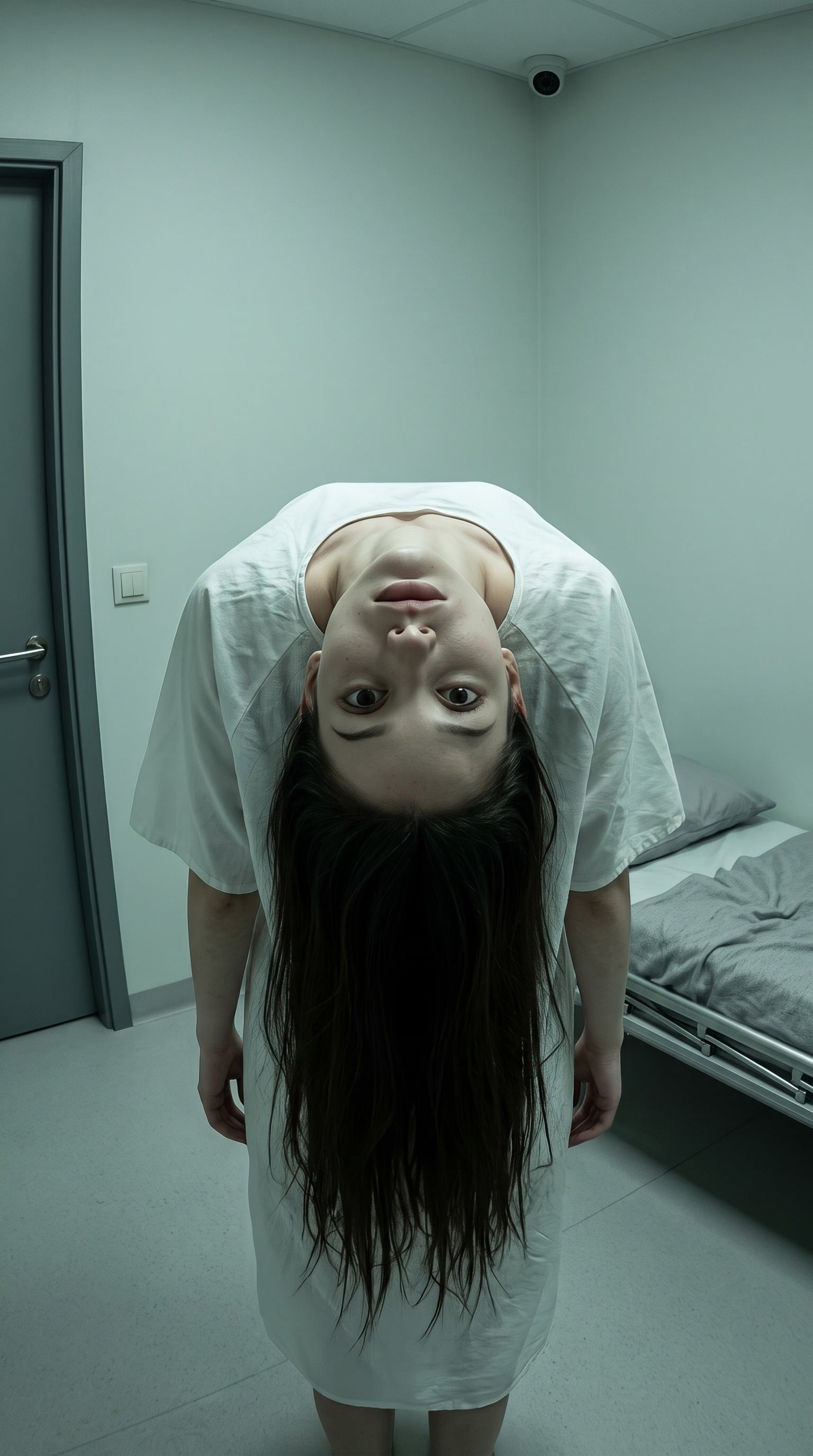
Upload your photo: a creepy Halloween shot from a security camera. You’re in a hospital room, head tilted back right into the lens.
“Hospital Room Camera” is an AI photo template. Upload your photo: a creepy Halloween shot from a security camera. You’re in a hospital room, head tilted back right into the lens. Upload your photo. The prompt is already inside, so there’s nothing to type. Nano Banana Pro, 30 credits per image at 2K, and you only pay for a finished result.
What you get
How it works
- 1. Tap “Make one like this”: the prompt is already inside, nothing to type.
- 2. Upload a photo to the “Your photo” field: face clearly visible, daylight, no filters.
- 3. Start the generation. You see the price up front and only pay for the result.
What people use it for
- A TikTok or Instagram post or carousel in a format that’s trending right now.
- An avatar or a story cover.
- A fun surprise for friends: the image is easy to share in a chat.
Photo and prompt tips
- Your photo: Face clearly visible, one person in the shot, no glasses or filters.
- Use daylight and skip filters and dark glasses: that way the AI captures your face more accurately.
- Not happy with the result? Run it again: every generation is a little different, and a new image takes a minute or two.
Template prompt
You can tweak it right in the generator: the template just fills in a starting point.
Use the uploaded photo as the identity reference: keep this exact woman's face, features and skin tone 1:1, recognizable, no beautification.

A creepy Halloween still frame from a ceiling security camera in a small, empty, sterile hospital room. The camera is mounted in the upper corner only about one meter above her head and looks steeply DOWN at her, wide-angle lens with slight distortion.

THE KEY POSE: she stands right under the camera and bends her upper back far BACKWARDS, her head dropped all the way back so that her face is turned straight up into the lens and appears UPSIDE DOWN in the frame: chin and lips at the TOP of her face, her eyes in the middle, forehead at the BOTTOM. Her long loose hair hangs from her forehead downwards in front of her chest and body like a curtain. Her neck and throat are visible above her face. Her shoulders and arms hang limp along her body. Wide-open eyes staring straight into the camera, blank unsettling expression, lips closed. Her upside-down face is large in the center of the frame, close to the camera; below it we see her shoulders, the hanging hair, the long loose white short-sleeved hospital gown and the floor.

Room: pale mint-gray smooth walls, a closed dark gray door with a metal handle and a light switch on the left, a narrow metal hospital bed with a gray blanket and gray pillow against the right wall, plain light gray floor. Nothing else.

Look: cold sickly greenish-teal tint, dim flat light, muted contrast, a little digital noise and softness like a real cheap camera still, realistic skin texture, not a drawing.

No on-screen text, no timestamp, no "CAM" label, no recording icons, no watermark. Square-ish composition centered on her upside-down face.
FAQ
- How do I make “Hospital Room Camera” from my photo?
- Tap “Make one like this” and upload your photo. In a minute or two the image appears in My generations, ready to download.
- How much does the “Hospital Room Camera” template cost?
- Nano Banana Pro, 30 credits per image at 2K. You see the price before you start, and you only pay for a finished result.
- Can I try it for free?
- Yes: new accounts get 50 credits, enough for a first generation with this template.