Christmas Tree
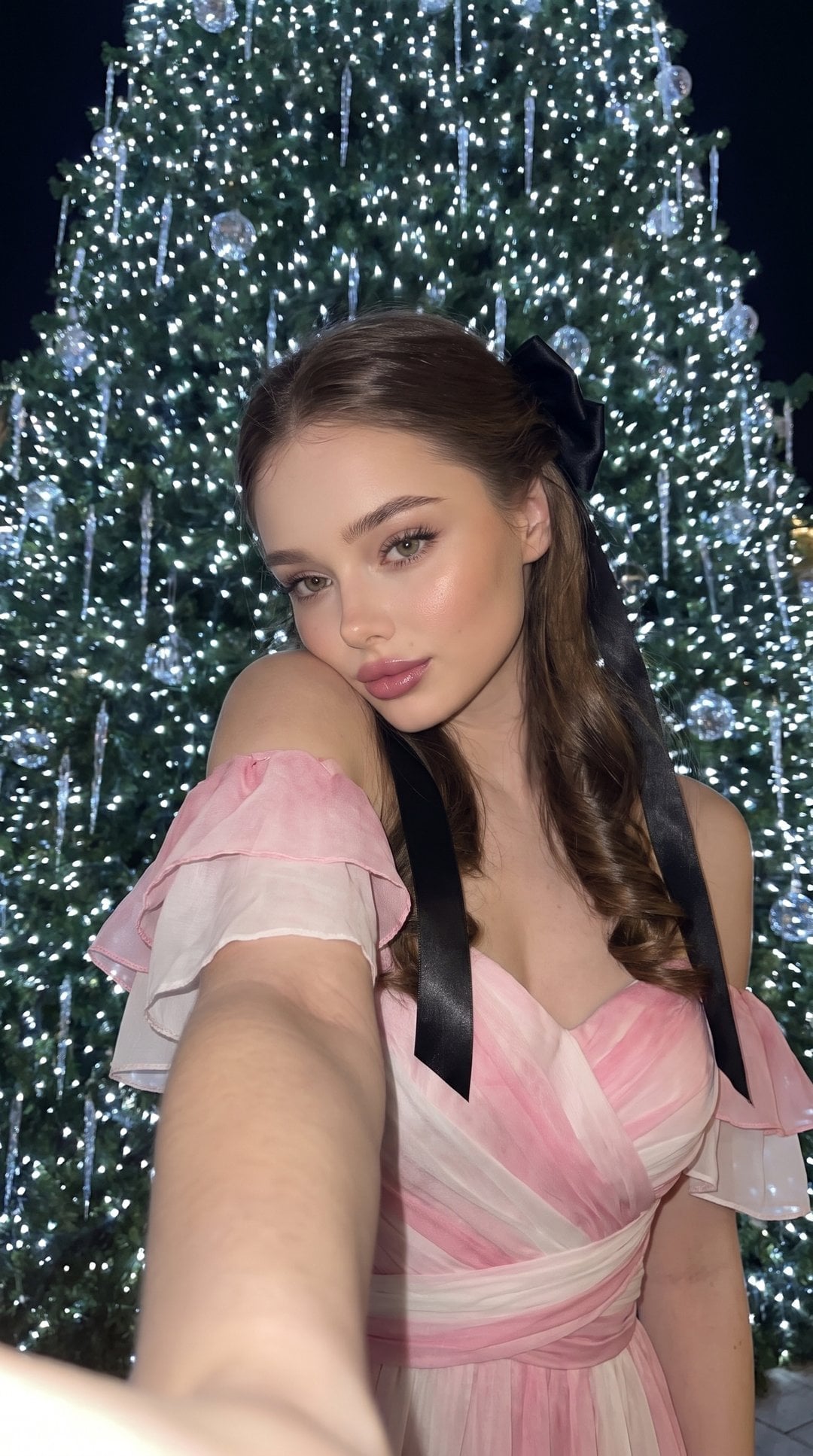
Upload a selfie: a Christmas tree at night in white lights and icicles, a pink off-the-shoulder dress, a black bow in your curls and a soft arm’s-length selfie.
“Christmas Tree” is an AI photo template. Upload a selfie: a Christmas tree at night in white lights and icicles, a pink off-the-shoulder dress, a black bow in your curls and a soft arm’s-length selfie. Upload your photo. The prompt is already inside, so there’s nothing to type. Nano Banana Pro, 30 credits per image at 2K, and you only pay for a finished result.
What you get
How it works
- 1. Tap “Make one like this”: the prompt is already inside, nothing to type.
- 2. Upload a photo to the “Your photo” field: face clearly visible, daylight, no filters.
- 3. Start the generation. You see the price up front and only pay for the result.
What people use it for
- A TikTok or Instagram post or carousel in a format that’s trending right now.
- An avatar or a story cover.
- A fun surprise for friends: the image is easy to share in a chat.
Photo and prompt tips
- Your photo: Face clearly visible, one person in the shot, no glasses or filters.
- Use daylight and skip filters and dark glasses: that way the AI captures your face more accurately.
- Not happy with the result? Run it again: every generation is a little different, and a new image takes a minute or two.
Template prompt
You can tweak it right in the generator: the template just fills in a starting point.
Photo 1 is me, an adult woman: keep exactly my face, face shape, eye colour, eyebrows, nose, lips, freckles and moles, skin tone, hair colour and hair length, the same person, instantly recognizable. Keep my Slavic appearance. Take only my face and hair from photo 1, ignore its pose, clothes and background.

Create a vertical 9:16 night selfie taken on an iPhone with my arm stretched toward the camera, in front of a huge Christmas tree outdoors. Pose exactly like this, never mirrored: my outstretched arm holding the phone comes in from the lower LEFT corner of the frame toward the camera. My body is turned three-quarters to the right, I tilt my head to the LEFT side of the frame and rest my cheek on my raised bare shoulder on the LEFT side of the frame (the side where my arm comes in), the top of my head leans toward the left edge, and I look into the lens with a soft, dreamy, slightly sultry look, lips closed in a soft pout. My face is in the upper middle of the frame.

Look: my hair styled in big glossy soft curls, half-up, with a large black satin bow tied at the back of my head, its long black satin ribbons falling down over my hair on the right side. Soft glam makeup: fluffy lashes, warm bronzed glowing skin, rosy mauve glossy lips. I wear a romantic pink-and-white chiffon dress with off-the-shoulder ruffled sleeves (two layers of sheer ruffles) and a draped sweetheart bodice with a wrapped waist.

The phone itself is NOT visible, only my arm. Background: a giant Christmas fir tree fills the whole background edge to edge, no sky visible, densely covered with thousands of tiny cold-white fairy lights and hanging clear glass icicle ornaments that sparkle, against the dark night sky.

Light and look: night, soft phone flash on my face, the twinkling white lights behind me slightly out of focus with bokeh, real candid iPhone selfie, natural skin texture, not AI-looking.

No text, no captions, no watermarks.
FAQ
- How do I make “Christmas Tree” from my photo?
- Tap “Make one like this” and upload your photo. In a minute or two the image appears in My generations, ready to download.
- How much does the “Christmas Tree” template cost?
- Nano Banana Pro, 30 credits per image at 2K. You see the price before you start, and you only pay for a finished result.
- Can I try it for free?
- Yes: new accounts get 50 credits, enough for a first generation with this template.